Morning Huddle - Front Desk Reminders
What is shown in the Front Desk Reminders section?
Front Desk Reminders
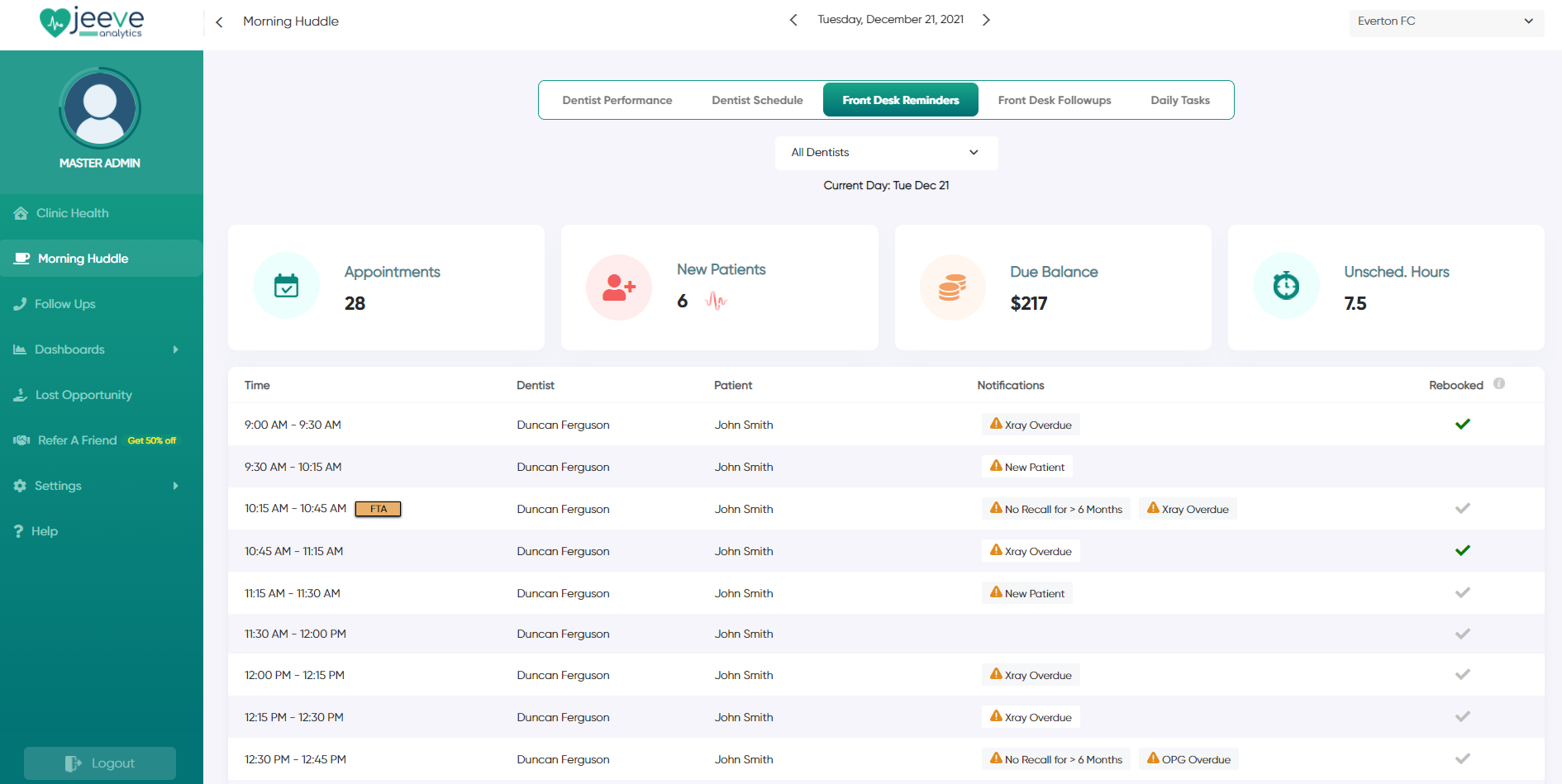
Front Desk Reminders shows a breakdown of the current day's schedule for Front Desk staff.
The top section shows an overview for the day, including total number of appointments, new patients, due balances and number of unscheduled hours.
Front Desk Reminders shows a breakdown of the current day's schedule for Front Desk staff.
The top section shows an overview for the day, including total number of appointments, new patients, due balances and number of unscheduled hours.
The table underneath this displays the current days schedule, highlighting several important notifications:
Notifications
- Due balances (outstanding invoices)
- Overdue Recalls
- Overdue X-rays (over 2 years since last X-rays, or no X-rays in patients history)
- Overdue OPGs (over 5 years since last OPG and patient > 16 years, or no OPG's in patients history)
- New Patients / Birthdays
- Repeat No-Shows (patients with 3 or more FTA/UTA's)
Rebooking's
The rebooking's column will provide ongoing feedback throughout the day on which patients re-book.
A green tick indicates that the patient rebooked 'on the day'. A grey tick indicates that the patient didn't rebook on the day, but already has an appointment in the future.
Notifications
- Due balances (outstanding invoices)
- Overdue Recalls
- Overdue X-rays (over 2 years since last X-rays, or no X-rays in patients history)
- Overdue OPGs (over 5 years since last OPG and patient > 16 years, or no OPG's in patients history)
- New Patients / Birthdays
- Repeat No-Shows (patients with 3 or more FTA/UTA's)
Rebooking's
The rebooking's column will provide ongoing feedback throughout the day on which patients re-book.
A green tick indicates that the patient rebooked 'on the day'. A grey tick indicates that the patient didn't rebook on the day, but already has an appointment in the future.
Related Articles
Morning Huddle - Overview
How does the Morning Huddle work? The Jeeve Morning Huddle is designed to be data driven and provide your team with a playbook for the day. It is populated each day with key information for your practice - showing you the key summary of the previous ...Morning Huddle - Front Desk Followups
What is shown in the Front Desk Followups section? Front Desk Followups Front Desk Followups displays a table for each followup enabled in your system. There can be up to five tables shown to display the different types of followups available in ...User Roles in Jeeve
What permissions does each user have in Jeeve? The master login created when signing up to Jeeve has full access to the system.In addition to this, there are four user roles which can be used to create new users and control their level of Jeeve ...Google Reviews - Sending a Review Invite
How do I send a review invite? Sending a review invite Jeeve users with access to the Morning Huddle - Front Desk Reminders page have the ability to send review requests to patients. Each patient will appear in your Morning Huddle with a "Send" ...Morning Huddle - Dentist Schedule
What is shown in the Dentist Schedule section? Dentist ScheduleDentist Schedule shows a breakdown of the current day's schedule for your clinicians. The top section shows a summary for the current day, including total number of appointments, new ...