How do I set up my Followups?
Followup's are populated for you automatically each day in the Morning Huddle.
Ideally these should be completed daily by your front desk staff. To cater for holidays, weekends / closed days and any busy days, any incomplete follow-ups will remain visible in the Morning Huddle for the next 2 days.
Note: after 2 days, any incomplete follow-ups can still be viewed by using the "Followups" item on the left-hand menu, which provides monthly breakdowns for all follow-ups.
There are currently five types of followups, which can be customised as outlined below.
Post Op Followups
Post Op followups can be triggered for patients who had any treatment you choose. When a patient has any of these treatment items performed, they will be added to your Post Op follow-up list 1 day later (by default - this is customisable).
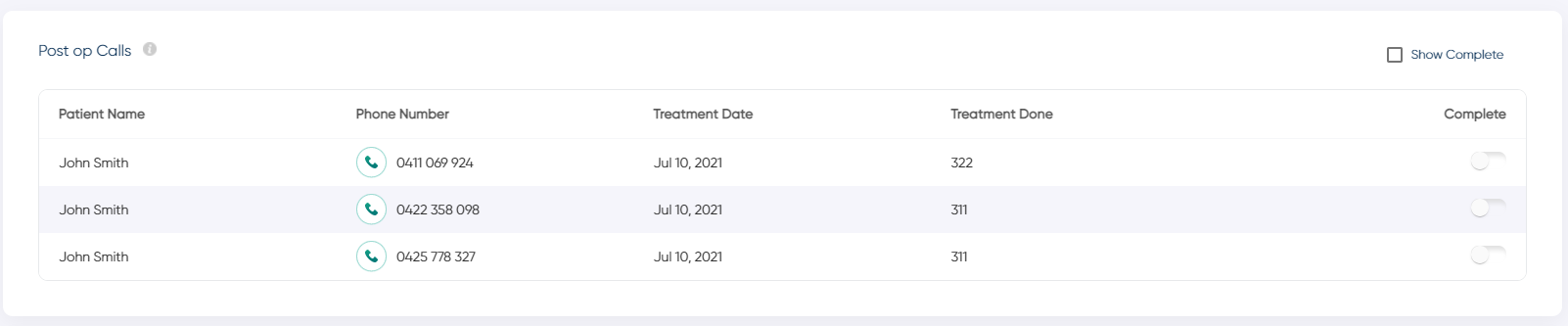
To setup your post-op codes, click on Settings -> Clinics -> Followups
Here you can enter your Post Op codes (comma separated), and select the number of days later you want the followups to be generated.

Post Op followups can be triggered for patients who had any treatment you choose. When a patient has any of these treatment items performed, they will be added to your Post Op follow-up list 1 day later (by default - this is customisable).
To setup your post-op codes, click on Settings -> Clinics -> Followups
Here you can enter your Post Op codes (comma separated), and select the number of days later you want the followups to be generated.
Overdue Recall Followups
Overdue Recall followups are populated automatically for patients who had their last check-up/clean 7 months ago (30 weeks) by default.
The number of weeks can be adjusted under Settings -> Clinics -> Followups.
Overdue Recall followups are populated automatically for patients who had their last check-up/clean 7 months ago (30 weeks) by default.
The number of weeks can be adjusted under Settings -> Clinics -> Followups.
TICK Followups
Tick follow-ups (as in Tickle diary), are follow-ups triggered based on you entering the "TICK" code on a patients treatment tab. These followups are designed as a solution to those patients who don't want to book "on the day", and require a followup at a later date.
Tick follow-ups (as in Tickle diary), are follow-ups triggered based on you entering the "TICK" code on a patients treatment tab. These followups are designed as a solution to those patients who don't want to book "on the day", and require a followup at a later date.
TICK follow-ups will be populated 7 days later (by default). The number of days can be adjusted under Settings -> Clinics -> Followups.
Further to this, you can use the codes TICK7, TICK14, and TICK28 to generate follow-ups 7, 14 or 28 days later.
Patients will appear in this list, along with their outstanding treatment items (from their active treatment plans).
Patients will appear in this list, along with their outstanding treatment items (from their active treatment plans).
FTA / UTA Followups
FTA and UTA followups are triggered when an FTA/UTA is entered in your PMS. Jeeve caters for these being created via item codes and also appointment status.
By default, these lists will be populated with patients who FTA/UTA "on the day" (ie. 0 days later), and excludes any patients who have an appointment booked within the next 28 days.
You can adjust the number of days under Settings -> Clinics -> Followups
eg. Changing this to "1 Day Later" will mean that patients are added to your followup list the next day, if that patient doesn't have an appointment within the next 28 days.
FTA and UTA followups are triggered when an FTA/UTA is entered in your PMS. Jeeve caters for these being created via item codes and also appointment status.
By default, these lists will be populated with patients who FTA/UTA "on the day" (ie. 0 days later), and excludes any patients who have an appointment booked within the next 28 days.
You can adjust the number of days under Settings -> Clinics -> Followups
eg. Changing this to "1 Day Later" will mean that patients are added to your followup list the next day, if that patient doesn't have an appointment within the next 28 days.


Related Articles
FTA / UTA Followups
How do the FTA / UTA follow-ups work? FTA / UTA Followups Morning Huddle Your FTA and UTA followups are populated in your Morning Huddle daily. This is used to capture any patients who have Failed to Attend or were Unable to Attend. By default, these ...TICK Followups
How do the TICK follow-ups work? TICK Followups Morning Huddle Your TICK followups are populated in your Morning Huddle daily. This is used to capture any patients who have been assigned the "TICK" treatment code in your PMS. A followup is ...Morning Huddle - Front Desk Followups
What is shown in the Front Desk Followups section? Front Desk Followups Front Desk Followups displays a table for each followup enabled in your system. There can be up to five tables shown to display the different types of followups available in ...Followup Scripts
What are follow-up scripts? Follow-up scripts allow you to set 'transcripts' for your staff to read from, as they make the various type of follow-up calls. These transcripts will appear above each follow-up table in your Morning Huddle and Followups ...Post Op Calls
How do the Post Op follow-ups work? Post Op Followups Morning Huddle Your post op calls are populated in your Morning Huddle daily. These followups are based on the item codes you have selected in your Jeeve settings (see How to setup your followups ...