Creating Follow-up Scripts
How do I create follow-up scripts?
How do I add a follow-up script?
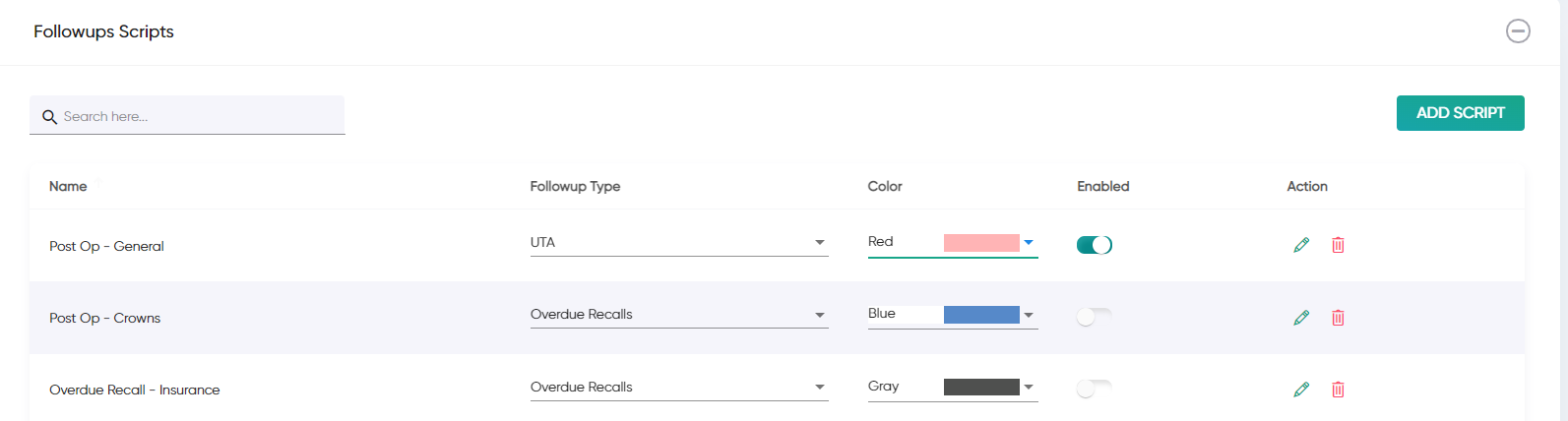
Follow-up scripts can be added under Settings -> Clinics -> Followup Scripts
Follow-up scripts can be added under Settings -> Clinics -> Followup Scripts
1. Click on the "Add Script" button
2. Fill out the details, including name (which will appear on the icon), the text (transcript) and which type of Followup this is for in the "Followups Type" dropdown box.
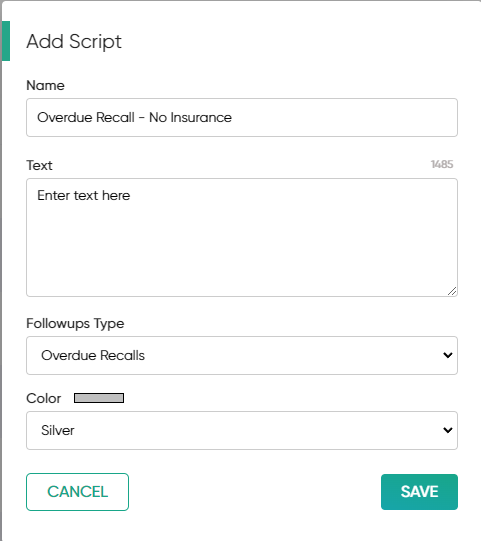
3. Select an appropriate colour to differentiate between the scripts and click Save.
4. This script will now appear in your Morning Huddle and Followups sections.
4. This script will now appear in your Morning Huddle and Followups sections.

Related Articles
Followup Scripts
What are follow-up scripts? Follow-up scripts allow you to set 'transcripts' for your staff to read from, as they make the various type of follow-up calls. These transcripts will appear above each follow-up table in your Morning Huddle and Followups ...Google Reviews - Creating an Invite Template
How do I create a template? Creating a Google Review invite template Jeeve administrators and users will access to "Settings -> Clinics -> (choose clinic) -> SMS Templates" can create message templates for Google Reviews. When creating a template, ...How do I setup the Google Reviews feature?
Setting up Google Reviews You can now send Google Review invite requests to your patients, directly from your Morning Huddle! To enable this feature, there are a few simple steps to follow 1. Add Your Google Link See Google Reviews - Adding your ...Number of Ticks
How is number of TICKS calculated? Number of TICKs This metric shows the total number of TICKs (follow-ups) added to your PMS in the selected time period. TICKs are used to denote that a follow-up is required for this patient, often used to allow the ...What codes do I need to add to my PMS?
Some things simply cannot be tracked with your PMS. To work around this, we recommend that you create the following treatment item codes in your system - for use with Complaints, Follow-ups and Referrals. To add these, go to Location Setup --> Items ...